From "Ultra-Fast Connectivity" to "Smart Sensing"This upgrade gives the Fiber network the power of “spatial awareness”. Wi-Fi Sensing technology operates much like a bat’s echolocation, it analyzes whole-home Wi-Fi 7 signal reflections and fluctuations across your home to detect movement and subtle shifts - completely camera-free . Transformers your network into the home’s central "nervous system," it enables your living space to intuitively perceive and respond to your family’s need. Enjoy gigabit speeds exceeding 1Gbps, alongside effortless smart convenience, backed by Macau’s, first “100% privacy-first, zero-camera" home monitoring solution. Note: iOS users can use this feature within the "CTM Wi-Fi Butler" app. |
Ideal For Target Users
|
Office Workers
|
Frequent Business Travelers &
|
Solo Dwellers & Independent Living
|



Mode Setting
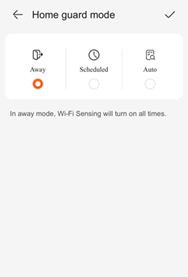
| Mode A: Away Mode
Best For: Ideal for extended absences, such as vacations and business trips.
|
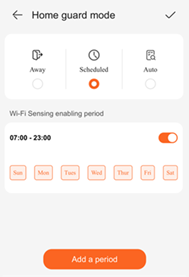
Mode B:Work Mode
Best For: Suitable for commuters and students with regular daily routines. Key Features:Set custom daily monitoring schedules (up to two separate time slots per day, e.g., morning and afternoon). Monitoring activities only during designated hours seamlessly aligning with your day.
|
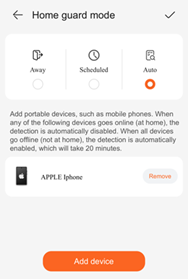
Mode C: Smart Mode (Recommended)
Best For: Perfect for families looking for effortless, fully automated experience. Key Features:Fully automated arming with zero manual operation. Simply register family members’ mobile phones in the CTM Wi-Fi Butler App. The system automatically arms when the last person leaves and disconnects from Wi-Fi, and disarms the moment any family member returns and reconnects – effectively eliminating false alarms.
|
📐 Device Placement Guide by Different Unit Layouts
|
The place of your device directly affects Wi-Fi Sensing performance. You may refer to the following residential floor plans to achieve optimal coverage and accuracy. 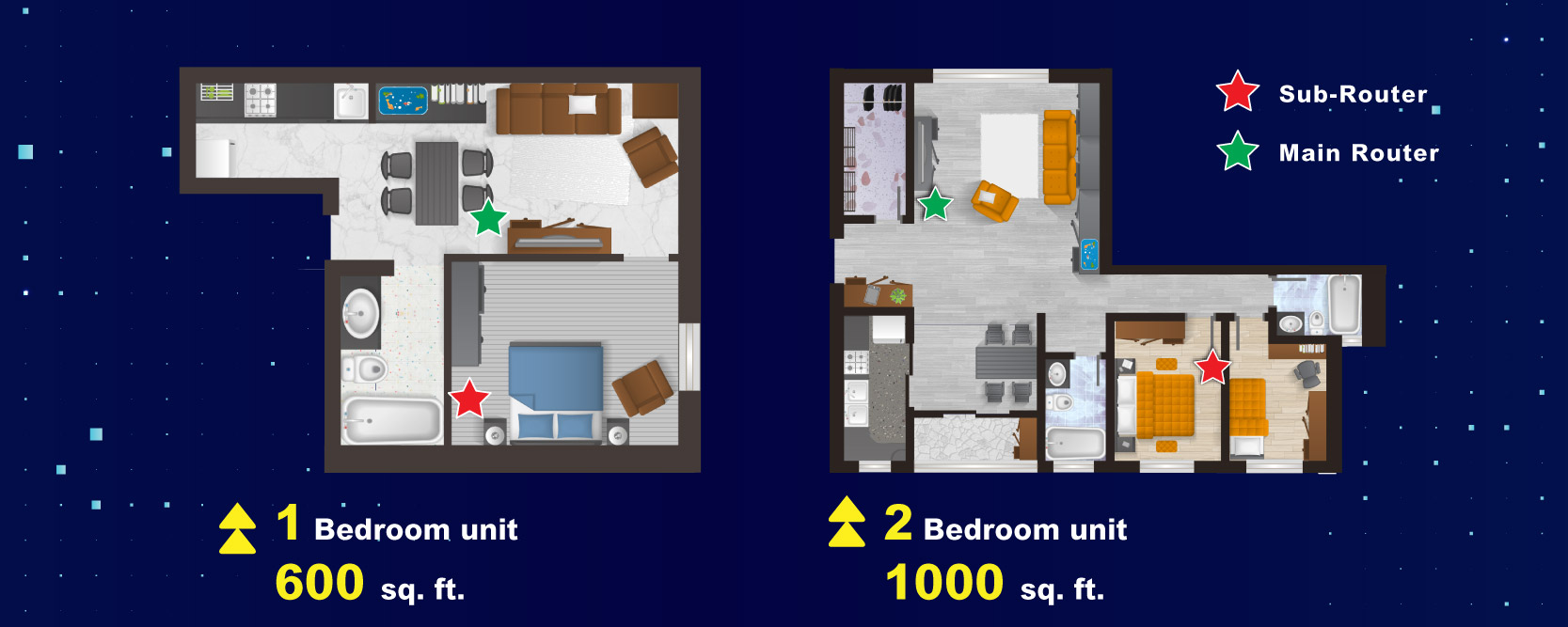 💡 Placement and Usage Tips:
|
How Wi-Fi Sensing Works:
Wi-Fi Sensing detects indoor motion by analyzing real-time variations in amplitude, phase, and channel state during Wi-Fi signal propagation. The main router connects seamlessly with sub-routers in each room to create whole-home optical network. As individuals move or change postures, signal reflection patterns shift, allowing the system to accurately detect presence and movement.
|
✔ No Extra Cost: No extra device needed. Simply update your existing Wi-Fi router’s software to access sensing capabilities for 24/7 continuous environmental monitoring.
|
✔ High Privacy: Detection relies entirely on signal fluctuations rather than visual images, effectively safeguarding your private space. |
|
✔ Wall Penetration: Wi-Fi signals penetrate most non-metallic obstacles, overcoming infrared installation limits while staying unaffected by light, temperature, and moisture.
|
✔ AI Smart Detection : Built-in AI adapts to your home, completing layout modeling and calibration within 5–10 minutes of startup to effectively eliminate noise interference from home appliances, curtains, etc. |
|
Wi-Fi Butler App
|

Note:
- The Feature serves only as an auxiliary tool and must not be used as the sole means of monitoring, nor can it serve as a substitute for professional security, medical monitoring or emergency rescue services.
- The Feature is available only to customers who have subscribed to or are authorised to use the designated FTTR Internet service, and have installed compatible Network Devices and the App.
- If you no longer wish to use the Feature, you may manually disable it on the Motion Sensing page of the App. After you disable the Feature, the App will immediately cease collecting the aforesaid information, and you shall be deemed to have withdrawn your consent for the App to continue providing the Feature to you.
- Enabling the Wi-Fi Sensing feature indicates that you have read and agreed to the "Wi-Fi Sensing Feature Agreement" under the "Fiber 360° Super Wi-Fi Internet Service".
- Wi-Fi Sensing Feature will be available on iOS first, and the Android version will be released in the future.
- Customer has read and agreed to be bound by CTM's 'Acceptance Use Policy ( AUP )' and 'General Terms & Conditions of Internet Services', which are also accessible online ( www.ctm.net ) or at any of CTM Shops upon request